
Do You Need a VPN for International Travel? (2026 Guide)
Do You Actually Need a VPN for International Travel?
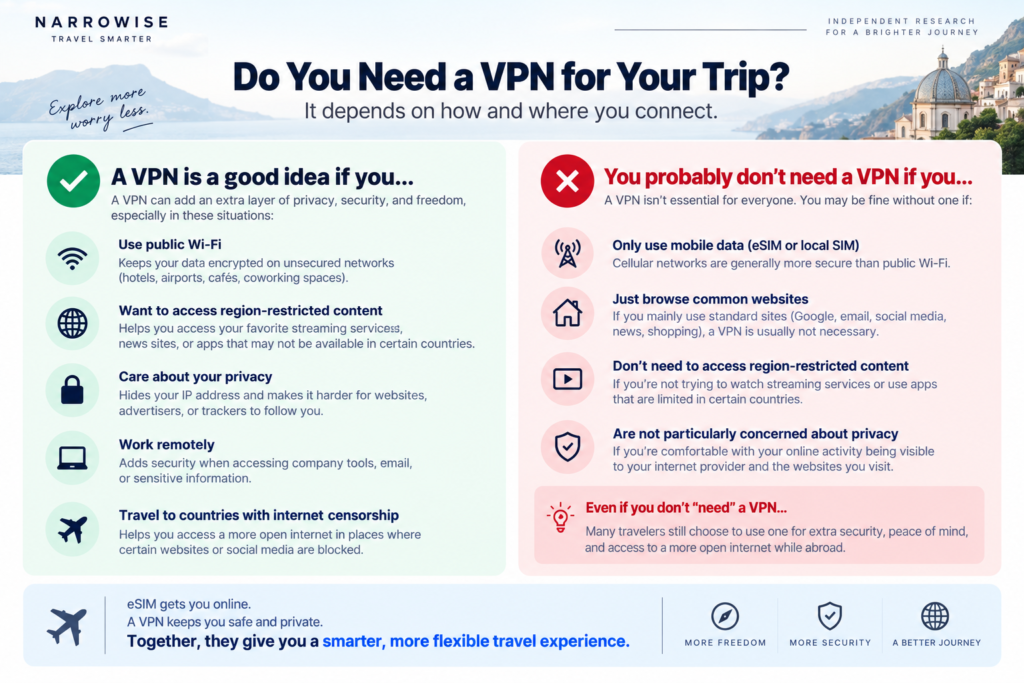
Short answer: You do not need a VPN simply because you are traveling internationally. If you mostly use cellular data or an eSIM and stick to reputable apps and HTTPS websites, a VPN may be optional. It becomes more useful if you frequently use hotel, airport, or café Wi-Fi, access sensitive accounts, work remotely, or need to connect through a server in another country.
If you mostly use cellular data or an eSIM, stick to reputable websites and apps, and don’t need to access services from your home country, you may be perfectly fine without one.
But a VPN becomes much more useful if you regularly connect to hotel, airport, or café Wi-Fi, access sensitive accounts while traveling, work remotely, or want easier access to online services you normally use at home.
The best question isn’t:
“Do travelers need a VPN?”
It’s:
“Do you need a VPN for the way you travel?”
Use the quick test below to find out.
Do You Need a VPN? Take the 30-Second Test
Answer these six questions.
1. Will you regularly use hotel, airport, café, or other public Wi-Fi?
If yes, a VPN may be useful.
2. Will you access banking, work accounts, email, or other sensitive services?
If yes, having an additional privacy layer may be worth considering.
3. Do you want to access online services you normally use at home?
A VPN can sometimes help by letting you connect through a server in another country.
4. Do you plan to stream while traveling?
A VPN can be useful for travelers who want more flexibility when accessing their usual services abroad, although availability depends on the service, your subscription, your location, and the platform’s terms.
5. Are you traveling somewhere with internet restrictions?
A VPN may be useful, but VPN laws and restrictions vary by country. Always check local rules before traveling.
6. Will you mostly use cellular data or an eSIM instead of public Wi-Fi?
If yes, your need for a VPN may be lower.
Your Result
| Your Travel Style | Our Take |
|---|---|
| Mostly eSIM/mobile data, Maps, messaging, and basic browsing | You probably don’t need a VPN |
| Normal vacation with occasional hotel Wi-Fi | Nice to have, but not essential |
| Frequent airport, hotel, and café Wi-Fi | Worth considering |
| Banking, work accounts, or sensitive information | Strongly consider one |
| Frequent international traveler | Likely worth it |
| Need access to services from home | Likely useful |
When a VPN Is Actually Worth Using While Traveling
A VPN can be useful in several common travel situations, but the reason matters.
Using Airport Wi-Fi
Airport Wi-Fi is convenient, especially during long layovers.
Most modern websites and apps already encrypt your connection using HTTPS, so simply connecting to airport Wi-Fi does not automatically mean your passwords are exposed.
However, a VPN adds another encrypted layer between your device and the VPN server. It can also reduce the amount of information the local network can see about your browsing activity.
For travelers who spend a lot of time in airports, that added privacy can make a paid VPN easier to justify.
Using Hotel Wi-Fi
Hotel Wi-Fi is one of the strongest use cases for a travel VPN.
You may spend several nights connected to the same network while checking email, booking transportation, working, or accessing personal accounts.
Again, a VPN does not magically make every online activity safe.
But if you regularly use hotel networks, having your VPN automatically available on your phone and laptop can be convenient.
Using Café and Other Public Wi-Fi
The same principle applies to cafés, train stations, lounges, coworking spaces, and other shared networks.
Public Wi-Fi itself is not automatically dangerous. In fact, the FTC notes that widespread HTTPS encryption has made public Wi-Fi considerably safer than it was in the past.
Still, a VPN can provide an additional privacy layer, especially if you frequently jump between unfamiliar networks.
When You Probably Don’t Need a VPN
This is the part many VPN affiliate articles skip.
A VPN is useful for some travelers.
That doesn’t mean everyone needs to buy one.
You Mostly Use an eSIM or Cellular Data
If you spend most of your trip using your cellular connection rather than public Wi-Fi, your need for a VPN may be much lower.
For many vacationers, an international eSIM plus basic online security practices may already be enough.
You Only Use Basic Travel Apps
If your typical travel internet use looks like this:
- Google Maps
- iMessage
- Uber
- airline apps
- restaurant searches
- basic web browsing
a paid VPN may not add enough value to justify another subscription.
You Rarely Use Public Wi-Fi
If your hotel Wi-Fi use is limited to ten minutes of browsing before bed, buying a VPN purely for that reason may be unnecessary.
You’re Taking One Short Trip
A one-week vacation is very different from traveling internationally six times per year.
The more often you travel, the easier it becomes to justify paying for a VPN.
What Happens If You Travel Without a VPN?
For most travelers, nothing dramatic happens simply because they travel without a VPN. Millions of people use their phones and laptops abroad without one.
But depending on how you connect to the internet, going without a VPN means giving up some of the privacy and flexibility a VPN can provide.
Without a VPN:
- Your regular IP address is visible to websites and online services you use.
- You don’t have the additional encrypted tunnel between your device and a VPN server.
- The network you’re connected to may be able to see more information about your internet activity.
- Some websites or online services you normally use at home may behave differently or be unavailable abroad.
That doesn’t mean traveling without a VPN is automatically unsafe.
If you mostly use cellular data or an eSIM, keep your devices updated, use HTTPS websites, enable two-factor authentication, and avoid suspicious links, you may decide that a VPN isn’t necessary for your trip.
The point isn’t to make travel without a VPN sound dangerous. It’s to understand what a VPN adds—and decide whether those benefits matter for the way you travel.
What Does a VPN Actually Protect You From?
A VPN creates an encrypted connection between your device and the VPN provider’s server.
That can help prevent the local network from directly seeing much of your internet traffic and can hide your normal IP address from websites you visit.
But a VPN does not protect you from everything.
A VPN cannot stop you from:
- entering your password into a fake website
- falling for a phishing email
- downloading malware
- using a compromised password
- sending money to a scammer
Think of a VPN as one privacy and security tool, not a complete cybersecurity shield.
You should still use strong passwords, two-factor authentication, updated software, and common sense when clicking links.
The FTC similarly recommends strong passwords, two-factor authentication, software updates, and checking that websites use HTTPS regardless of how you connect to the internet.
Do You Need a VPN If You Already Have an eSIM?
This is one of the easiest travel-tech concepts to misunderstand.
An eSIM and a VPN do completely different jobs.
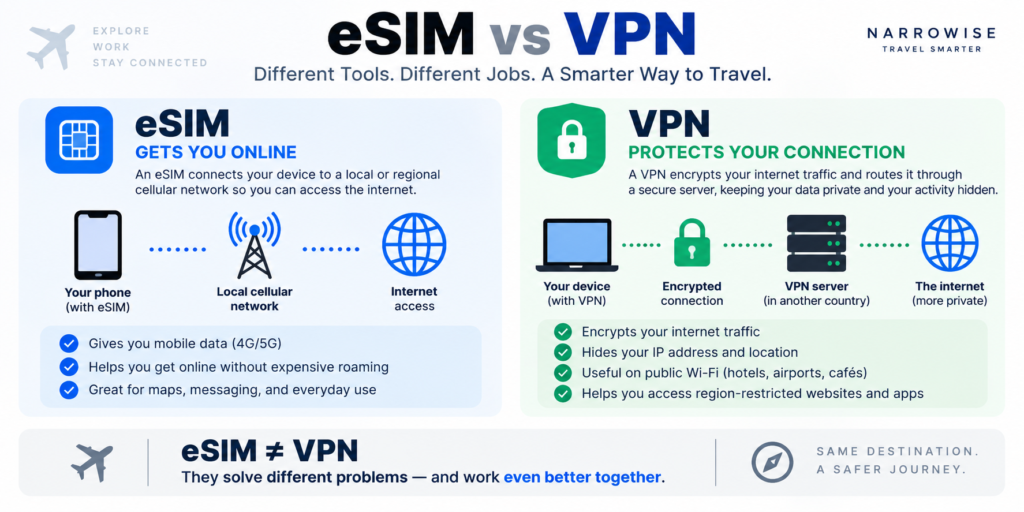
eSIM
An eSIM gives your phone access to a cellular network while traveling.
Think:
How do I get online?
VPN
A VPN changes how your internet traffic is routed after you are connected.
Think:
How does my internet connection travel from my device to the internet?
So buying an eSIM does not automatically replace a VPN.
But if you use cellular data almost exclusively, you may decide that you simply don’t need the additional features of a VPN.
If You Do Need a VPN, Is NordVPN a Good Choice for Travel?
For many travelers, yes.
But we wouldn’t recommend NordVPN simply because it is a well-known VPN.
It makes the most sense for travelers who actually benefit from the features they are paying for.
NordVPN currently includes Auto-connect settings across major platforms including Windows, macOS, Android, and iOS, allowing users to automatically connect on Wi-Fi or other selected network types.
That can be particularly useful while traveling because you may connect to several unfamiliar networks during a single trip.
NordVPN Makes the Most Sense If You:
- travel internationally several times per year
- regularly use hotel or airport Wi-Fi
- use both a phone and laptop while traveling
- want a VPN that requires relatively little manual setup
- want automatic VPN connections on unfamiliar networks
- want one VPN service you can continue using after your trip
NordVPN May Not Be Worth It If You:
- rarely travel
- mostly use cellular data
- almost never connect to public Wi-Fi
- only need a VPN for a few days
- want the cheapest possible option
- don’t need the additional functionality a paid VPN provides
Our Take
If you travel regularly and expect to use public Wi-Fi on your phone and laptop, NordVPN is one of the easiest mainstream options to consider.
[Check the current NordVPN offer →]
Affiliate disclosure: Narrowise may earn a commission if you purchase through our links, at no additional cost to you. Our recommendations are based on our independent research and are not determined by affiliate relationships.
How to Use NordVPN at Airports and Hotels
There is one practical issue travelers should know before using any VPN on hotel or airport Wi-Fi.
Many public networks use something called a captive portal.
That is the page where you might need to:
- accept terms and conditions
- enter your hotel room number
- enter an email address
- confirm free Wi-Fi access
A VPN can occasionally prevent that page from appearing.
NordVPN specifically recommends completing the captive-portal login before reconnecting the VPN. Its support instructions say users may need to temporarily disable Auto-connect and Kill Switch, join the Wi-Fi network, complete the portal login, reconnect NordVPN, and then re-enable those protections.
A Simple Travel Routine
1. If NordVPN Auto-connect or Kill Switch prevents the Wi-Fi login page from appearing, temporarily disable those features and disconnect the VPN.
2. Connect to the hotel or airport Wi-Fi.
3. Complete the Wi-Fi login or captive portal.
4. Reconnect NordVPN.
5. Re-enable Auto-connect and Kill Switch if you normally use them.
6. Then continue browsing or accessing sensitive accounts.
This is also why installing and logging into your VPN before leaving home is a good idea.
You don’t want to troubleshoot a new app while sitting in an airport with limited internet access.
Should You Leave Your VPN On All the Time While Traveling?
You don’t necessarily have to.
One practical approach is to enable Auto-connect when using Wi-Fi and let the VPN connect automatically when you join unfamiliar networks.
NordVPN currently allows Auto-connect to be configured for different network types on supported platforms.
For many travelers, that is easier than remembering to manually activate the VPN every time they enter a hotel, airport, café, or lounge.
What About Online Banking While Traveling?
Using a VPN can add privacy to your connection, but it does not guarantee that your bank will like the connection.
Banks use security systems that may react to:
- unusual countries
- unfamiliar IP addresses
- new devices
- unusual login behavior
So if you need access to banking while abroad:
Use the bank’s official app or website, enable two-factor authentication, and avoid suspicious links.
A VPN should be treated as an additional privacy tool rather than your only security measure.
What About Remote Work?
A VPN can be useful when working from hotels, airports, coworking spaces, and cafés.
But there is an important distinction:
Using a VPN does not override your employer’s remote-work policy.
Some companies restrict international work for cybersecurity, tax, compliance, insurance, or employment reasons.
If your employer does not allow you to work from another country, using a VPN to hide your location does not make that policy disappear.
Always follow your employer’s rules.
Free VPN vs Paid VPN for International Travel
You do not automatically need a paid VPN.
For occasional use, a reputable free VPN may be enough.
But paid VPNs generally become easier to justify if you:
- travel frequently
- use several devices
- want consistent performance
- use a VPN regularly rather than occasionally
- don’t want to worry about restrictive usage limits
The question again comes back to your travel habits.
If you barely need a VPN, don’t pay for features you won’t use.
If you regularly rely on one, paying for a reliable service may make more sense.
Is NordVPN Worth Paying for Just for Travel?
For a single short vacation?
Maybe not.
For someone who travels several times per year, frequently uses hotel and airport Wi-Fi, works from a laptop while traveling, or wants the convenience of automatic VPN connections?
Much easier to justify.
That is the distinction we would use before deciding whether to buy NordVPN.
NordVPN Is Probably Worth Considering If:
- international travel is a regular part of your life
- you frequently connect to unfamiliar Wi-Fi networks
- you want a simple setup across your devices
- you value convenience enough to pay for it
[See NordVPN’s current pricing and offers →]
Bottom Line: Should You Get a VPN Before Your Trip?
You do not need a VPN simply because your passport is leaving the country.
For many travelers who use an eSIM, cellular data, modern encrypted apps, and only occasional public Wi-Fi, a VPN may be optional.
But if your trip involves frequent hotel and airport Wi-Fi, sensitive accounts, remote work, or regular international travel, a VPN becomes much easier to justify.
And if you decide you want a paid VPN, NordVPN is a strong option for travelers who want a mainstream service with useful travel features such as Auto-connect.
The important part is deciding based on how you actually travel, rather than buying a VPN simply because someone told you every traveler needs one.
[Check the current NordVPN offer →]
Frequently Asked Questions
Do I need a VPN for international travel?
Not necessarily. Travelers who mainly use cellular data or an eSIM and only use basic online services may not need one. A VPN becomes more useful if you regularly use public Wi-Fi, access sensitive accounts, work remotely, or want additional control over how your internet connection is routed.
Do I need a VPN for hotel Wi-Fi?
Not always, but frequent hotel Wi-Fi users may find a VPN useful as an additional privacy layer. Modern HTTPS encryption already protects most website traffic, so a VPN should not be viewed as the only thing keeping you safe online.
Do I need a VPN for airport Wi-Fi?
A VPN can be useful if you frequently use airport Wi-Fi, particularly on longer trips or during layovers. However, normal security practices such as HTTPS, updated software, strong passwords, and two-factor authentication remain important.
Do I need a VPN if I have an eSIM?
No. An eSIM and a VPN perform different functions. Your eSIM provides internet connectivity, while a VPN changes how your internet traffic is routed. If you mostly use cellular data, however, you may decide you don’t need a VPN.
Is NordVPN good for international travel?
NordVPN can be a good option for frequent travelers, particularly those who use multiple devices or frequently connect to public Wi-Fi. Its current apps support Auto-connect functionality on major platforms, which can make it easier to use while traveling.
Should I install a VPN before traveling?
Yes, if you plan to use one. Installing the app, signing in, and testing your connection before leaving home is easier than troubleshooting it after arriving in another country.
Can I use a free VPN while traveling?
Yes. A reputable free VPN may be enough for occasional users. Frequent travelers may prefer a paid service because of convenience, performance, device support, or other features.
Should I keep my VPN on all the time abroad?
Not necessarily. Some travelers prefer to automatically connect their VPN whenever they join Wi-Fi and disconnect when using trusted networks or cellular data.
Is it safe to travel without a VPN?
Yes, in many situations. If you mainly use cellular data or an eSIM and stick to HTTPS websites and trusted apps, traveling without a VPN can be reasonable. A VPN becomes more useful when you frequently connect to hotel, airport, or café Wi-Fi, access sensitive accounts, or work remotely.
How We Researched This Guide
We reviewed current guidance from the Federal Trade Commission (FTC) and official VPN documentation, then compared common international travel scenarios including hotel Wi-Fi, airport Wi-Fi, café Wi-Fi, cellular data, and eSIM use. Our goal was to identify when a VPN provides a meaningful benefit for travelers — rather than assuming everyone needs one.
Sources
- Federal Trade Commission (FTC) — Consumer guidance on public Wi-Fi and online security
- NordVPN Support — Auto-connect and Wi-Fi security documentation
- NordVPN Support — Captive portal and public Wi-Fi guidance





2 Comments
Comments are closed.